


The Spreadsheet Works, Until It Doesn’t
Every company starts with spreadsheets, and that’s not a problem by itself: for a small control, with few rows and one or two people looking, the spreadsheet works fine and at no cost. The problem shows up when the data volume, the number of people looking at the same file, and the frequency of decisions grow beyond what the tool was built to handle, and the signs below start piling up.
The Signs It’s Time to Migrate
The Data Is Already Outdated by the Time Someone Looks
If the spreadsheet depends on someone exporting and pasting data manually, every time that’s delayed, whoever is deciding is looking at a number that’s already no longer true. The delay can be a day or a week, but the effect is the same: the decision is made over an old snapshot of reality. In a Monday meeting, for example, the spreadsheet’s number usually reflects the previous Friday, and nobody notices until someone asks “does this already include the weekend?”.
There’s No Real Control Over Who Sees What
A shared spreadsheet usually gives all-or-nothing access: there’s no easy middle ground to show just the region or department of whoever’s looking, without copying the file and keeping two versions in parallel, each with its own risk of falling out of date. The common way to “solve” this in practice is sending a filtered copy by email, and then the company already has two spreadsheets of the same information, each updating at a different pace.
The Spreadsheet Freezes or Takes Too Long to Open
As the row count grows, the spreadsheet starts freezing, taking too long to recalculate formulas, or simply not opening on mobile: a clear sign the data volume has outgrown what the tool was built to handle, well before getting anywhere near the program’s technical row limit. Whoever feels this first is usually the person who depends most on the number, exactly the one who can least afford to wait for the file to load.
Nobody Fully Trusts the Number Anymore
When more than one version of the “same” spreadsheet circulates among different people, with slightly different formulas, trust in the number drops, and every decision comes with a “let me confirm that first” before any meeting that depends on that data. At some point, having a single source of truth stops being a luxury and becomes the only way to discuss the number without wasting time comparing versions.
Spreadsheet or Dashboard, Side by Side
| Criterion | Shared spreadsheet | BI dashboard |
|---|---|---|
| Refresh | Manual, by whoever remembers to export | Scheduled, or by direct query to the source |
| Access control | All or nothing for whoever gets the link | By person or group, including by data row |
| Data volume | Freezes or lags as the row count grows | Grows without the same file-opening limit |
| Trust in the number | Several near-identical copies circulating | A single source, the same for everyone with access |
The easiest difference to feel day to day is the first row of the table: whoever is used to updating the spreadsheet manually doesn’t always notice how much time that takes until comparing it with a source that refreshes on its own. The access control row is usually the one that worries most whoever handles financial or people data, because there the problem isn’t just convenience, it’s also governance over who can see what.
What Changes with a BI Dashboard
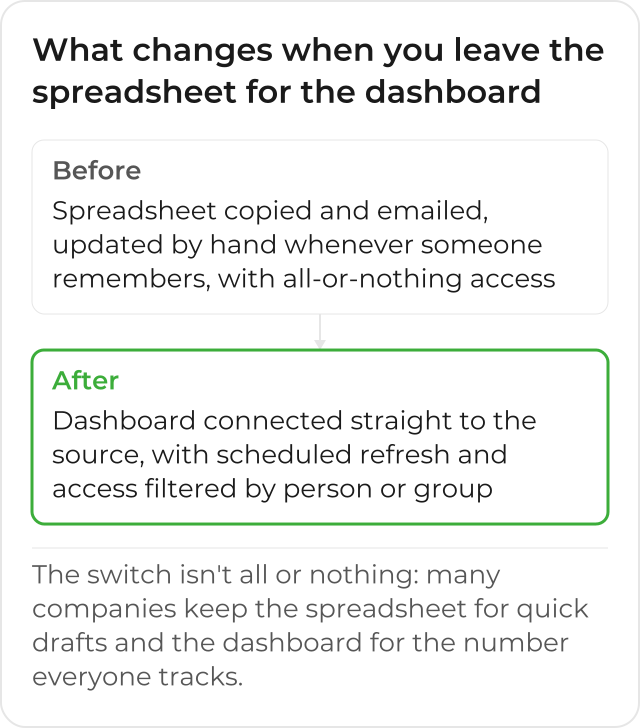
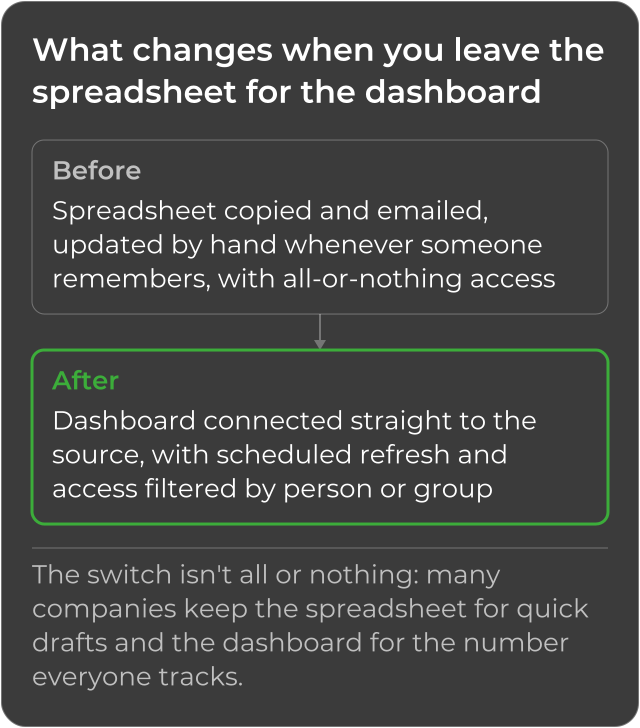
A dashboard like AWS Quick Sight’s connects directly to the data source, updates without anyone copying and pasting, and lets you give filtered access by person or group, directly solving the 4 signs in the table above. Quick Sight is part of AWS Quick.
The refresh can be scheduled or happen through a direct query to the source, every time the dashboard is opened; the choice between these two ways depends on how much simultaneous query load the original source can take. Filtered access goes beyond giving or not giving the link: for sensitive data, there’s also row-level security, which restricts which rows of the dataset each person or group sees, even when everyone accesses the same published dashboard.
Migrating Isn’t All or Nothing
Leaving the spreadsheet behind doesn’t mean deleting every spreadsheet in the company. A quick draft, for a one-off analysis nobody else will check again later, is still faster to put together in a spreadsheet than to prepare a formal dataset. The migration that solves the real problem is the one for the number several people check frequently, that feeds a recurring decision, and that today depends on someone remembering to update it manually.
Where the Migration Usually Starts
The first step usually isn’t building the dashboard itself, but mapping out where the spreadsheet’s number actually comes from: which system, which export, which database. Only after knowing the real source does it make sense to connect that source to a dataset and build the visualizations, instead of simply importing the current spreadsheet as it is, with the same problems inside it.
Map First, Then Connect
That mapping usually reveals something the spreadsheet was hiding: sometimes the number comes from 2 or 3 different systems, combined manually by whoever puts the spreadsheet together every week, and without that mapping the new dataset would risk repeating the same manual combination, just inside a different tool. Doing that assessment first avoids migrating the problem, instead of solving it.
What’s Left After Leaving the Spreadsheet
After the migration, the question that used to require opening a file, confirming the right version, and recalculating by hand now gets an answer straight from the panel, always with the same number for whoever is looking. Whoever decides stops asking “is this spreadsheet up to date?” and starts asking only what actually matters: what to do with the number on the screen. The Monday meeting starts with the panel already loaded, instead of waiting for someone to confirm which file is the right version.
History of Amazon QuickSight
Amazon QuickSight also went through 2 name changes. On October 9, 2025, it became Amazon Quick Sight, as part of Amazon Quick Suite (source: AWS). On November 9, 2026, when Amazon Quick was renamed to AWS Quick (source: AWS), the product became AWS Quick Sight. This text uses the current name, AWS Quick Sight.
CloudDog, an AWS Advanced Partner, implements AWS Quick Sight for companies that recognize the signs above and want to leave the spreadsheet behind without losing control over the data during the transition.
