


A month where half the team barely used any credit, and the other half got blocked
If your company already subscribes to Kiro per user, you have probably seen this pattern before: around day 20 of the month, two or three people on the team mention in the channel that they ran out of credit, right in the middle of a heavy sprint, while five others finish the month with most of their monthly limit untouched. Each seat has its own credit bucket, and one bucket cannot see the other: the credit left on the desk of a colleague who only did code reviews that week simply expires, and whoever is deep into a large refactor has to stop working or ask someone to buy extra credit, under pressure, in the middle of the task.
This mismatch is not a planning failure on your team’s part: it is how AI usage in code behaves in practice. No one uses the same amount of credit every month, each person’s work varies from week to week, and an individual subscription, by design, has no way to absorb that variation. The official credit pooling announcement describes exactly this scenario: “a handful of power users consume most credits while light users let their credits expire unused.” AWS’s answer to this problem, launched for Kiro Enterprise customers in November 2026, was precisely to change the billing model: instead of one bucket per person, a single pot, shared by the whole team.
What changes when credits go into a common pot
On an individual subscription, each user gets a fixed monthly credit limit, according to the plan (Pro, Pro+, Pro Max, or Kiro Power), and that limit resets every month, used or not. With credit pooling, the credits from every seat the company purchases go into a shared pool, and anyone on the team can draw from what is available in it, up to whatever limit the administrator sets for that person, their group, or their profile. Whoever uses little stops “losing” credit every month; whoever needs more has somewhere to draw from, without depending on an emergency purchase in the middle of a sprint.
Who credit pooling is for
Credit pooling is a billing model for Kiro Enterprise customers. Since launch, it has been the default for new Enterprise customers, and an existing Enterprise customer can opt in whenever they are ready. It is not the only way for a company to pay for Kiro: individual, per-user, per-plan subscriptions straight through the AWS account are still available, without joining any pool. The difference is that, with pooling, the company stops deciding each person’s plan individually and starts managing the team’s capacity as a whole.
How much each seat costs
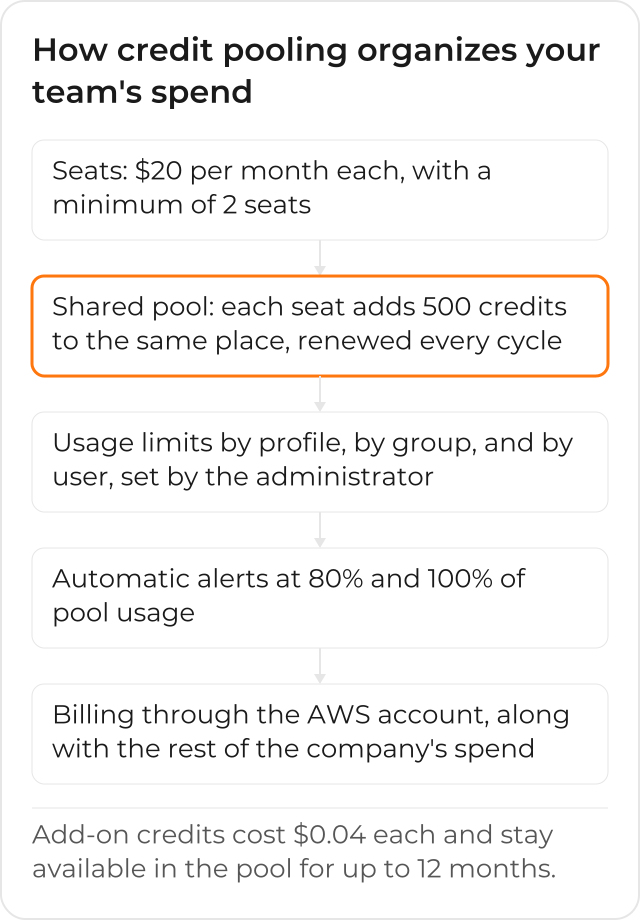
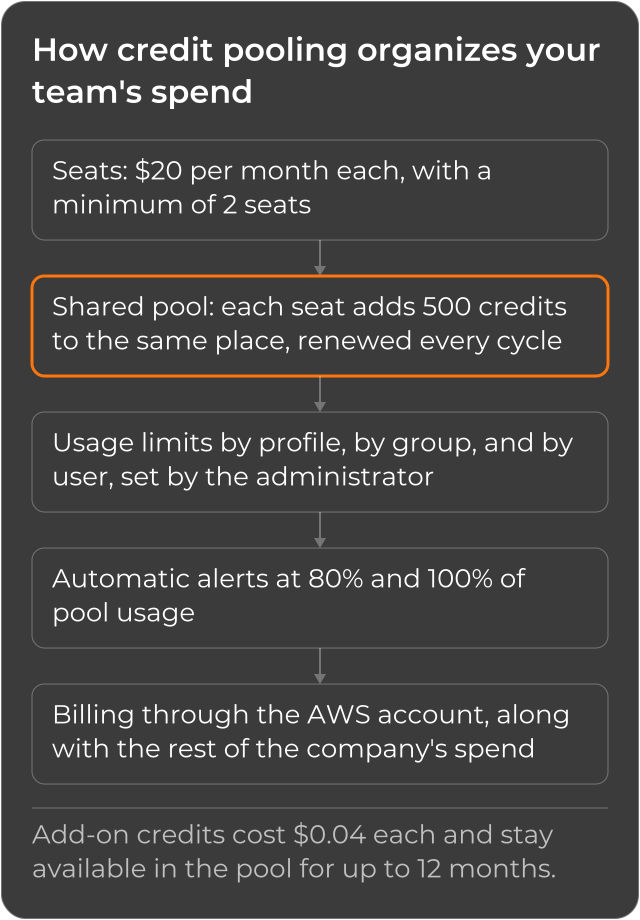
Each seat in the pool costs $20 per month, with a minimum of 2 seats for the company to use the model. Each seat contributes 500 credits to the shared pool, and that contribution renews every billing cycle, the same for every seat, regardless of which plan that person would use on an individual subscription. When the pool needs more capacity than the included credits provide, the administrator can buy add-on credits at $0.04 each, which stay available in the pool for up to 12 months, instead of expiring at the end of the month. The team draws first from the included credits of the current cycle, and only then from purchased add-on credits, starting with those closest to expiration: no one on the team needs to think about that order, it is automatic.
The example AWS itself uses to explain the gain
The official documentation illustrates the model with a concrete case: a company buys 20 seats and gets 10,000 credits per month in the shared pool, split across Engineering (9 people), Design (5 people), and Data Science (6 people). Without credit pooling, three developers who rarely use Kiro would leave their combined 1,500 credits (500 per seat) unused every month, while others who exhaust their individual limit quickly would need to buy add-on credits often. With the pool, those 1,500 leftover credits flow automatically to whoever is in the middle of a large refactor, with no one needing to rebalance anything manually. This same behavior, applied to your own team, is what resolves the scenario at the start of this post: the day-20 block and the idle credit of the calmer colleague.
Governance: who decides the limits, and how the company avoids a surprise bill
Sharing the pool does not mean giving up control. Whoever administers the company’s Kiro account can set usage limits at 3 levels, in increasing order of precedence: by profile, by group, and by individual user. For a person who belongs to more than one group, the highest limit among the groups they belong to applies, in the user’s favor. When someone on the team hits their assigned limit, usage is blocked until the administrator frees up more credit by buying add-on credits for the pool; there is no automatic surprise charge at the end of the month from someone “going over” without the administrator knowing.
Alerts before credit runs out
So the administrator does not need to watch the dashboard all the time, Kiro sends configurable alerts when credit usage reaches certain thresholds. By default, alerts fire at 80% and at 100% of usage, both against each individual user’s limit and against the limit of the entire pool, and against seat utilization versus purchased seats. That is the difference between finding out the pool is close to running dry on the dashboard, with time to react, and finding out when someone on the team is already blocked in the middle of a task.
How the account is billed, and how groups are managed
Credit pooling billing runs through the company’s AWS account, along with the rest of the AWS spend: Kiro shows up as one more line on the consolidated bill, instead of generating a separate charge to administer. The user groups that make up the pool can be created manually, or come straight from AWS IAM Identity Center, which keeps the administrator from having to maintain two lists of people in sync, one in Kiro and another in the company’s identity provider. If a person belongs to more than one group in the pool, the company pays for just one seat for them, with no double billing. The price of a seat in the pool is fixed ($20), so there is no “highest tier” to compare. (That comparison between tiers, with separate per-profile billing, is how per-plan subscriptions work for companies; see the Enterprise billing documentation.)
How your team’s workflow looks after adopting credit pooling
Whoever switches to credit pooling no longer needs to predict, seat by seat, how much credit each person will spend that month. The administrator looks at the pool as a whole, adjusts limits by profile or by group when a team changes pace (for example, close to a launch), and the 80% and 100% alerts warn before anyone gets blocked in the middle of their work. Whoever joins or leaves the team, or switches groups, does not require renegotiating an individual plan: seat reconciliation is automatic, and credits keep flowing from whoever uses little to whoever is at the peak of a task, with no manual intervention.
CloudDog, an AWS Advanced Partner, helps your team adopt Amazon Kiro with governance on the company’s AWS account, and choose between an individual per-plan subscription and credit pooling, depending on the size and usage pattern of your team. Get to know Amazon Kiro by CloudDog, check out Kiro Power to test it with AWS credit support, or the Amazon Kiro for Developers page if you are the one who writes the code and want to understand the model before proposing adoption to the company.
