


When a Loose Prompt Is Not Enough
Your team has probably already used an AI assistant on code every day: a quick chat request, and the function comes out ready, or close to it. For a small fix, that works fine. The problem shows up when the task grows: it touches 3 different modules, depends on an architecture decision someone made in the middle of a conversation, and 2 months later nobody remembers why that path was chosen. The conversation that explained the decision has already moved on to something else, or the session was closed weeks ago.
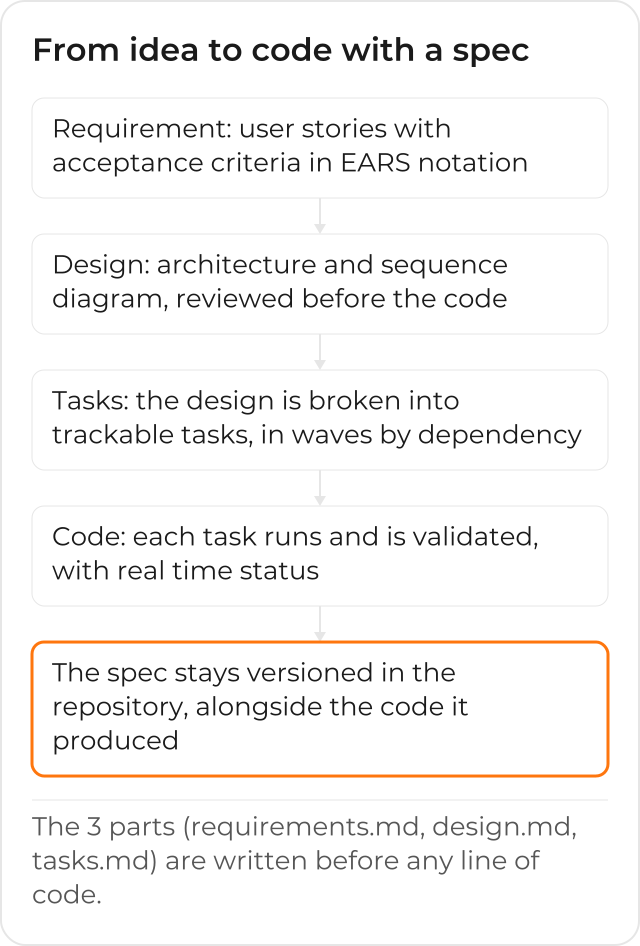
That gap, between the decision being made and the reason for it surviving, is exactly what spec-driven development was built to close. The idea, described in Kiro’s specs documentation, is simple to state and hard to practice without a tool that sustains the process: before any code, you formalize what needs to be solved, how it will be solved, and which steps get you there. These 3 parts stay written, reviewable, and later versioned in the same repository as the code they produced.
What a Spec Actually Is
A spec is not a requirements document filed away in a separate tool that nobody opens again after kickoff. In Amazon Kiro, every spec generates 3 files that live alongside the code, in the repository itself, and can be read, commented on and updated like any other file in the project.
The 3 Parts Every Spec Produces
requirements.md: the user stories and acceptance criteria, in the notation the next section explains.design.md: the technical architecture, with a sequence diagram and the implementation decisions, documented before the first line of code.tasks.md: the implementation plan, broken into discrete, trackable tasks, with status updated in real time as the work progresses.
The official documentation describes the flow in 3 phases, always
in this order: requirement (or bug analysis, for a bugfix spec), design and tasks. Each phase only
moves forward after the previous one has been reviewed, which is exactly the point: the
architecture decision does not stay lost in a chat conversation, it is written in design.md,
right next to the reason that led to it.
The EARS Notation in the Requirement
requirements.md uses EARS (Easy Approach to Requirements Syntax) notation to turn a loose
idea into a testable acceptance criterion. The pattern, per the
Feature Specs documentation, follows this format:
WHEN [condition or event]
THE SYSTEM SHALL [expected behavior]
A real example from Kiro’s own documentation:
WHEN a user submits a form with invalid data
THE SYSTEM SHALL display validation errors next to the relevant fields
The advantage of writing it this way, instead of a flowing sentence, is that every line is already a potential test case: it states the condition, the expected behavior, and nothing else. Whoever reviews it does not need to interpret the intent behind a paragraph; the requirement is already in the form it will be checked against.
From Approval in Each Phase to Waves of Tasks
Once tasks.md exists, you can run one task at a time, watching the status in real time, or run
them all at once. In that second case, Kiro builds a dependency graph across the tasks and groups
them into waves: the first wave runs every task with no dependency, in parallel; the next wave
unlocks the tasks whose dependencies the previous wave satisfied; and so on, until the last wave.
Waves run in sequence, but the tasks inside each wave run at the same time, which cuts execution
time quite a bit without you having to draw that order by hand.
Requirement First, or Design First
The Feature Specs documentation describes 2 workflow variants, and the choice depends on where your team’s thinking already stands. In the Requirements-First flow, you start from the behavior the system needs to have, and the design is generated from the requirements; it is the natural path when the feature comes from a product request or customer feedback, and the architecture still has room to adapt. In the Design-First flow, you start from an architecture or a low-level design you already have in mind, and the requirements are derived from it; it works better when the system has to meet a strict non-functional constraint (latency, throughput, compliance), or when you are porting a design that already existed in another tool. Neither one is “the right one”; the question is whether this project’s flexibility sits in the behavior or in the implementation.
How This Differs from a Loose Prompt
A direct prompt solves an isolated task: “change this function to do X.” It remains the fastest path for that kind of fix, and Kiro also has a quick-edit mode for it, sometimes called “vibe coding” in conversations about the code-assistant market. A spec comes in at a different moment: when the task spans several files or modules, or when the design decision needs to outlive the person who made it.
The difference is not about the “quality” of the code generated in one case versus the other. It is about what is left over afterward: with a loose prompt, what is left is the code and, if someone saves it, a chat history that is hard to search; with a spec, what is left is a structured artifact, in the same place as the code, that anyone on the team can open months later and understand why that path was chosen, without having to ask whoever wrote it.
Where This Fits into Your Team’s Day to Day
For most small, isolated tasks, a direct edit to the code is still the right path: writing a spec for a 2-line fix would cost more time than it saves. A spec pays off when the size of the task justifies the time it takes to write it, and that threshold varies from team to team. The most reliable signal is not the number of files, it is the question: if this decision gets questioned in 3 months, where is the answer?
How the Team’s Flow Looks After Adopting Specs
Teams that adopt specs trade “opening a new conversation and explaining the context again” for
opening the feature’s design.md and seeing the decision already recorded, with the reason right
next to it. The requirement, written in EARS, turns directly into a test script; the task plan
shows what is already done and what is left, without having to ask in the team’s chat; and when a
task needs to be revisited, the whole spec, not just the code, is right there, versioned, for
whoever has to review it.
CloudDog, an AWS Advanced Partner, deploys Amazon Kiro to your development team, with configuration, integration into your AWS account and training, so that adopting specs does not depend on each developer figuring out the process on their own. Check out CloudDog’s Amazon Kiro page, see Kiro Power to try it with AWS credit support, or the Amazon Kiro for Developers page if you are the one writing the code and want to understand the process before pitching adoption to the company.
