

Cloud Security Isn’t 1 Control, It’s Layers That Add Up
When someone on your team asks “is our AWS account secure?”, the answer is rarely a simple yes or no. Cloud security isn’t a single switch to flip, it’s a set of layers, each covering a different risk. Your company might have one layer very well configured, like identity, and another with a big gap, like network, without anyone noticing, because whoever looked at the problem only looked at one part of it.
The 5 Layers, One by One
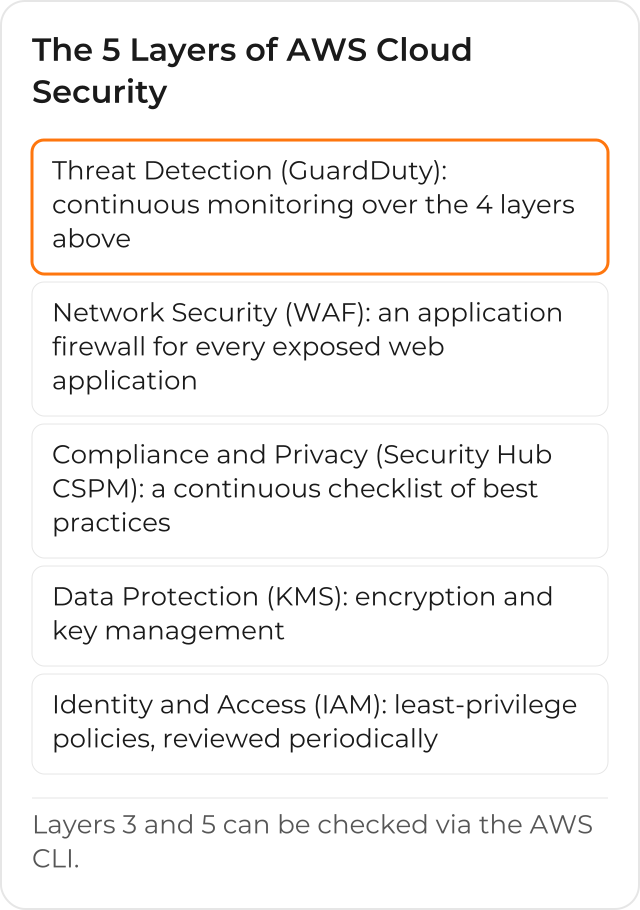
Thinking about your AWS account’s security through these 5 layers helps avoid the mistake of treating security as a project that ends, instead of a set of controls that needs to keep running after the initial project is over.
1. Identity and Access (IAM)
The first layer is who can do what. The IAM security best practices recommend least-privilege policies, reviewed periodically, that restrict access to data to whoever actually needs it, among employees, customers and authorized contractors, without granting more permission than the task requires. It’s a layer that accumulates forgotten permissions over time, as people change roles without the old access being reviewed.
2. Data Protection (KMS)
The second layer kicks in when the first fails: encryption and key management protect data even if someone gets access they shouldn’t have. AWS Key Management Service centralizes the creation, access control and rotation of those keys; turning on encryption for each resource, such as an S3 bucket or an EBS volume, is configuration of that service itself, which then uses the keys KMS manages.
3. Compliance and Privacy (Security Hub CSPM)
The third layer gives a continuous view of the AWS account’s compliance status, with automated checks against security and compliance standards, such as CIS, PCI DSS and NIST. AWS Security Hub CSPM brings these findings together in one place, instead of the company needing to check each security service separately to build that picture. Those CSPM findings, together with findings from other security services, feed the unified AWS Security Hub, which prioritizes the most critical risks.
4. Network Security (WAF)
The fourth layer protects every exposed access point in the infrastructure: an application firewall (AWS WAF) and adjusted network policies filter malicious traffic before it reaches the application. It’s the most visible layer from the outside, because it’s the first one an external attack encounters, but on its own it doesn’t solve what happens after a request has already passed through the firewall.
5. Threat Detection (GuardDuty)
The fifth layer is the continuous monitoring that turns the 4 layers above into vigilance, not just one-time configuration. Amazon GuardDuty analyzes data sources such as CloudTrail management events, VPC Flow Logs and DNS logs, using threat intelligence and machine learning models to identify suspicious activity, such as compromised credentials or unauthorized cryptomining on an EC2 instance.
Whose Responsibility Is It: AWS’s or Your Company’s
None of the 5 layers is AWS’s responsibility alone, or your company’s alone. The shared responsibility model splits the work: AWS protects the hardware, software, network and facilities infrastructure that runs all cloud services, and your company is responsible for the configuration that depends on the service chosen. On an Amazon EC2 instance, for example, the company manages the guest operating system, security updates and the instance’s firewall (the security group); on a more abstracted service, such as Amazon S3, AWS handles the infrastructure and the operating system underneath, and the company handles who can read and write each object.
The same model also describes mixed controls, where AWS and the company each handle a different part of the same responsibility: in patch management, AWS fixes flaws in the infrastructure, but the company patches the guest operating system and the applications running on it; in configuration management, AWS maintains its infrastructure devices, and the company configures its own operating system, database and application. Knowing which of the 3 categories, AWS alone, mixed, or the company alone, each of the 5 layers falls into avoids the mistake of assuming AWS already took care of something that, in practice, was left to the internal team.
How to Check if GuardDuty and Security Hub CSPM Are Already Enabled
Before assuming layers 3 and 5 are already covered, it’s worth checking. The 2 AWS CLI commands below return the status of each service on the account, without changing anything:
aws guardduty list-detectors
aws securityhub describe-hub
The first lists the GuardDuty detector’s identifier in the Region, if one exists; the second returns Security Hub CSPM’s ARN when it’s already enabled on the account, or an error stating the service hasn’t been activated yet. An infrastructure team can run both in every Region the company uses, to quickly map where layer 3 and layer 5 are still missing.
Why the Well-Architected Security Pillar Treats This as a Process
The Security pillar of the AWS Well-Architected Framework doesn’t describe security as a list of boxes checked once: it describes best practices for designing, delivering and continuously maintaining secure workloads. That’s why a security assessment isn’t a report the company reads once and files away, it’s a snapshot of the moment, which needs review again as the infrastructure changes.
A Gap Worth Checking
In AWS accounts with more than one account inside the organization, there can be a gap: layer 5 (GuardDuty) covers the first account, created at the start of the project, but accounts that came later, from a new team or an acquisition, end up left out until someone audits the full account list and compares it against GuardDuty’s status in each one. The same audit applies to layer 3: Security Hub CSPM enabled in just one account doesn’t cover the rest. The 2 commands from the “How to Check if GuardDuty and Security Hub CSPM Are Already Enabled” section, run account by account and Region by Region, are the fastest way to confirm this, instead of assuming the initial setup already covers the whole organization.
How to Know if Your Company Is Covering the 5
A security assessment evaluates the current posture across the 5 layers and points to where to focus first, before any larger investment in a new tool. See how CloudDog’s Security Assessment works, as in the case “Strengthening Security and Governance in the Cloud for Financial Services”, for a client in the financial sector.
