


Before Mapping Anything, a Simple Question
Every company that decides to build a Data Lake reaches a point where the architecture already seems decided, but the question “where to start” still has no answer. It’s common for a technical team to jump straight into choosing tools (which storage service, which catalog, which query engine) before answering a simpler question: what data the company already has, where it lives today, and who needs to query each one.
That reversed order is expensive. A Data Lake designed without that initial assessment tends to grow full of data nobody can trace back to its source, with no control over who can read what, and with no real query running months into the work. The path that works is the opposite one: assess first, design the architecture next, and only then get into implementation.
The Path from Assessment to the First Query
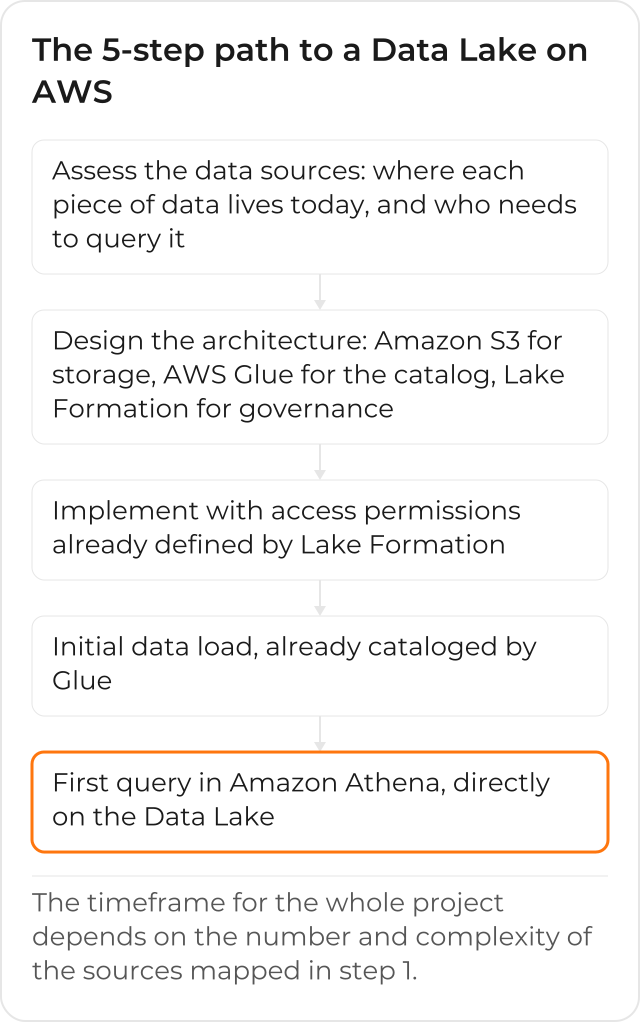
The 5 steps below follow that order on purpose: each one prepares the ground for the next, and skipping one usually means going back later to redo what was left missing.
Step 1: Assess Your Current Data Sources
Before designing any architecture, you need to map where the company’s data lives today: CRM, ERP, control spreadsheets, application logs, legacy systems that still hold part of the operation. For each source, the assessment also records how structured it already is (a relational database, for example) or isn’t (a set of plain-text log files), because that difference changes what the next step is going to design.
That assessment isn’t an isolated technical survey: it also asks who, on the business side, needs to query each of these sources, and how often. Without that answer, the architecture that follows risks being technically correct and still not answering the question that motivated the project in the first place.
Step 2: Design the Architecture on AWS
With the sources mapped, the Data Lake architecture is designed around 3 pieces that work together.
The Role of Amazon S3, AWS Glue and Lake Formation
Amazon S3 is the storage layer: it receives the raw data, in any format, without requiring the structure to be defined before storing anything. AWS Glue is the serverless service that discovers, catalogs and prepares that data: Glue crawlers infer the schema automatically and register that information in a central catalog, which is what lets you query the data later without having to manually remember where each file is. And AWS Lake Formation centralizes access control: who can read what, with fine-grained permissions at the column, row or cell level, applied consistently across analytics services like Amazon Athena, Amazon Redshift Spectrum and Amazon EMR, among others, without having to repeat that configuration in each tool separately.
Step 3: Implement with Governance from the Start
The Data Lake implementation is born with those permissions already defined by Lake Formation, instead of opening up the storage first and sorting out access later. That order matters: fixing access control after the data is already spread out and being queried by several teams is a much bigger job than defining permissions before the first load.
Step 4: Initial Load and Cataloging of the Data
The sources mapped in the first step are connected and loaded into the Data Lake, already going through Glue’s catalog so they’re findable in the queries that follow. This is the moment where the difference between a structured and an unstructured source shows up in practice: Glue can infer the schema of many sources automatically, but some formats need extra preparation before they’re ready to query.
Step 5: The First Query in Amazon Athena
With the data loaded and cataloged, Amazon
Athena lets you query the Data
Lake directly, without moving the data anywhere else. The snippet below follows the format of a
CREATE EXTERNAL TABLE from Athena’s official documentation, pointing at a sales log file stored
in S3:
CREATE EXTERNAL TABLE daily_sales (
  sale_date string,
  product string,
  quantity int,
  total_value double
  )
ROW FORMAT DELIMITED
FIELDS TERMINATED BY ','
STORED AS TEXTFILE
LOCATION 's3://clouddog-data-lake-example/sales/'
Each statement runs on its own, one at a time, in Athena’s query editor: once the table exists, the first business query can already run against it.
SELECT product, SUM(total_value) AS total
FROM daily_sales
GROUP BY product
ORDER BY total DESC
That’s the first query that actually returns a business answer (which products sold the most, for example), instead of just confirming the data landed in the right place. It’s also, usually, the first moment the business side sees a tangible result from the project.
How Long This Path Usually Takes
The first Data Lake dashboard usually gets ready within the first few weeks after the initial load; the timeframe for the whole project, from assessment to the first recurring query, depends directly on the number and complexity of the sources mapped in step 1. A poor assessment at the start tends to stretch out exactly the final steps, because data-quality problems that should have been caught in step 1 end up showing up only when it’s time to query.
Common Mistakes When You Skip One of the Steps
Skipping the assessment in step 1 is the costliest mistake of the 5: without knowing which sources exist and who needs to query each one, the architecture in step 2 ends up designed for a generic “store all the data” use case, instead of for the actual business questions the team needs answered. The typical result is a technically correct Data Lake that nobody queries, because none of the original questions were taken into account in the design.
Skipping governance in step 3, and leaving access control for later, is costly in a different way: the data is already spread out and being queried by several teams by the time someone remembers to define who can read what. At that point, restricting access means negotiating with teams that already built reports and processes on top of open access, instead of simply configuring a permission before anyone depends on it.
And skipping the cataloging in step 4, loading data without registering its schema in Glue, turns the Data Lake into a pile of files with no map: every new query requires manually rediscovering where each piece of data is and what format it’s in, exactly the work the catalog was supposed to eliminate from the first load on.
What Your Team’s Day-to-Day Looks Like After the First Data Lake
Once the first Data Lake is live, with governance from the start and Glue’s catalog keeping everything findable, the question the business side asks stops being “where is this data” and becomes the actual business question. New sources follow the same 5-step path, instead of opening an exception every time someone needs a new piece of data; and the access control defined back in step 3 keeps holding, without needing to be redone for every new source.
CloudDog runs this process, from assessing the sources to the first recurring query, on the Data Consulting and Data Lake with AWS page.
